Ok, now it is time to create the Music List File. ‘What’s this then?’ you might ask... That’s easy. The Music List File is just a text, html, or mdb file that contains information about your cleaned-up files.
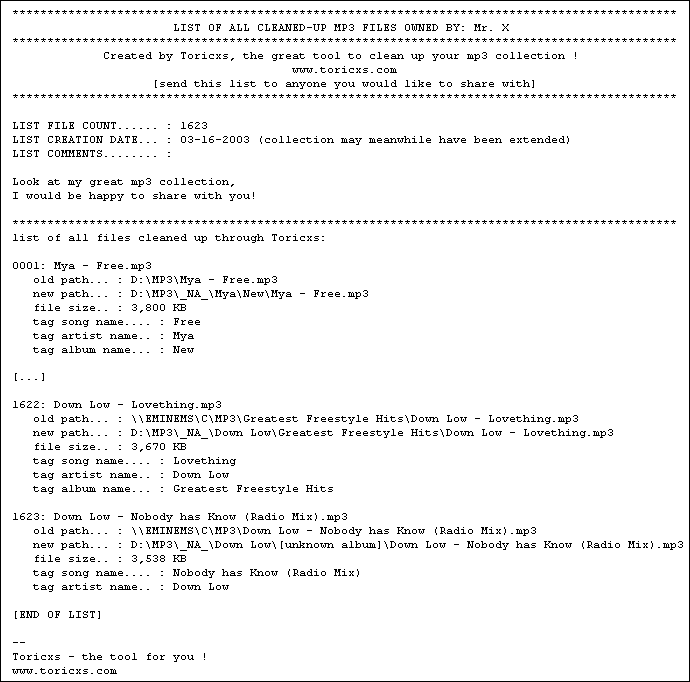
Imagine you want to share music files, for instance with your friend in an other country. He or she wants to have some special songs but does not know if you can serve them (if you own them at all). To make him/her happy you can send him/her the Music List File that can be created after cleaning up your files. This file contains information about your files, that is the old and new path, the size, artist and song name, the album, year and comment as well as your name and your comment. Here’s an example of how the file could look like:
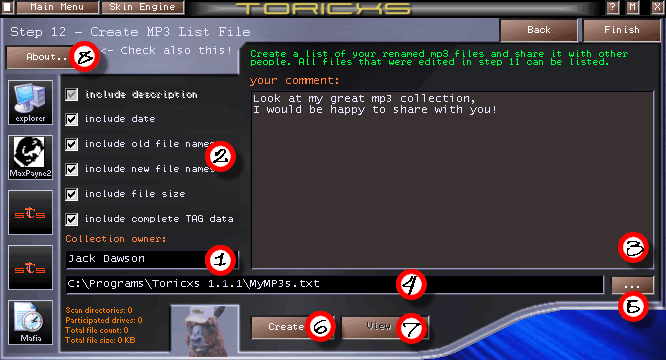
It is surely usable to quickly create the file and save it on your hard disk so that you can send it if required. The creation works in the following way:
-
enter your name into the related text field (1)
-
select here (2) what is to be printed into the list file. The best is to take all (‘description’ means the stuff between the asterisk-lines and cannot be disabled as necessary).
-
enter your comment (into box (3)). Examples: “You get two of mine for two of yours”, “DJ Fake rules!” or “CD Ripping rules!”
-
enter the path to the file to create into field (4). If you are too lazy to type then use the browse button (5). The file can be located in any directory you have write access for. So if everyone cleans up his collection on a LAN-party then the list files could be collected on a central server (file name enumerated, on a network drive). So your gaming clan has something to offer when wanting to share files with other clans.
-
finally press the ‘Create’-button (6) to create the file (rather fast).
-
After the creation, you can instantly view the file by pressing the ‘View’-button (7).
Congratulation! Now the cleaning process is completely finished. You can now leave Toricxs or you can go back to step 1 and repeat the cleaning process for further files. Generally, repeat the cleaning process when having downloaded new music files. You can move these files over to your collection directory, while the files are cleaned up during the moving with Toricxs. Music sharing rules!




Toricxs HTML Help: Step 12 - MP3 List File